تحميل وتثبيت أفضل تطبيقات IPTV لعام 2026
هل تبحث عن أفضل تجربة لمشاهدة القنوات المشفرة والأفلام؟ في StreamHub Pro، نوفر لك أقوى التطبيقات المتوافقة مع سيرفراتنا لضمان بث ثابت بدون تقطيع وبجودة 4K. هذا الدليل الشامل سيساعدك على اختيار التطبيق الأمثل لجهازك وكيفية ضبطه في ثوانٍ.
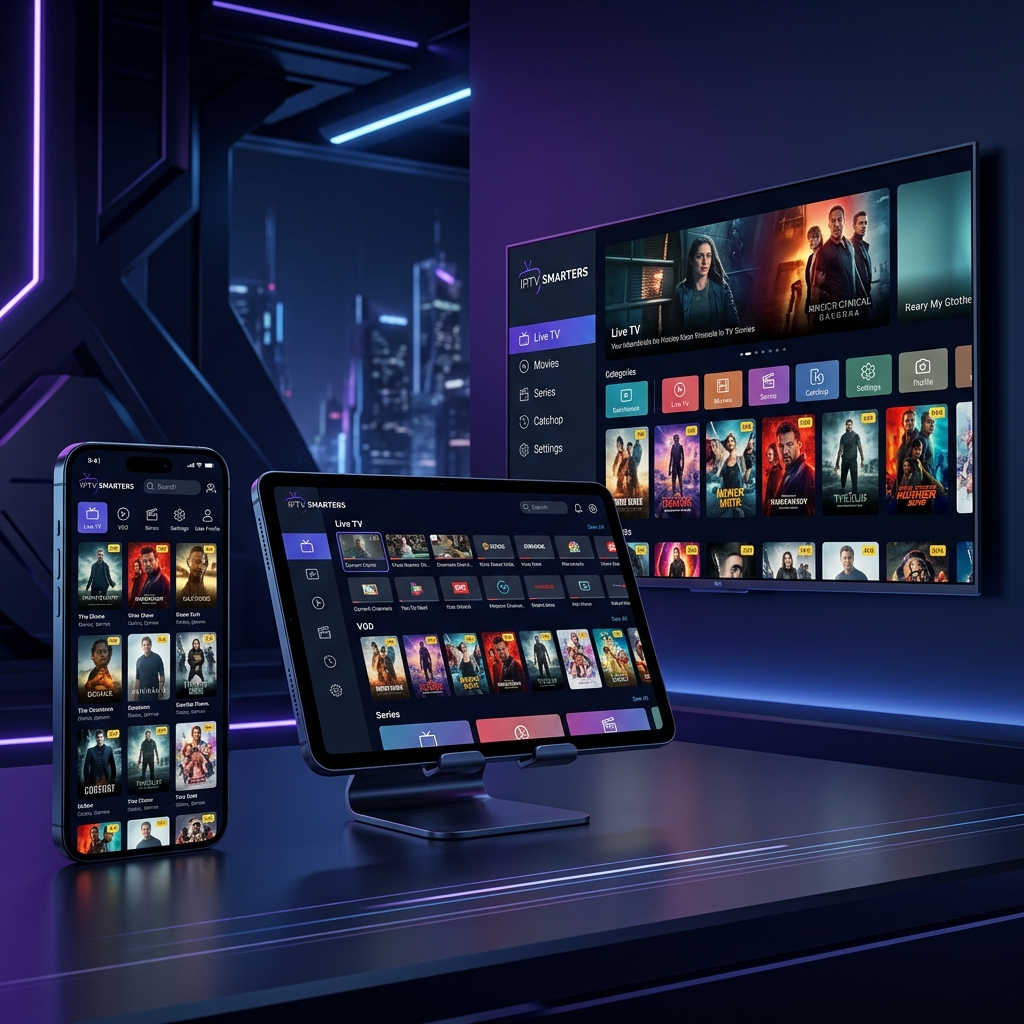
What is IPTV and How Has It Changed Home Entertainment?
IPTV technology, or Internet Protocol Television, is not just a
way to watch channels; it is a fundamental shift in how we
consume media. Instead of relying on traditional satellite
dishes and cables that are affected by weather and location,
IPTV transmits data over the internet.
With StreamHub Pro, we take this technology to
new heights. We do not just provide channels; we offer a robust
cloud infrastructure that ensures instant access to over 15,000
global channels and a massive library of movies and series in up
to 4K quality. The secret lies in distributing content via
high-speed CDN (Content Delivery Network) servers spread
worldwide, minimizing latency (Ping) and completely eliminating
buffering.
Direct Download Links for All Platforms
Android / TV Box / Firestick
- 4K/HDR Support
- PVR Recording
- Parental Control
- Smart Search Tool
iPhone / iPad / Apple TV
- AirPlay Support
- Huge VOD Library
- Auto-Update Channels
- Arabic / Multi-language
Why Do We Recommend IPTV Smarters Pro?
IPTV Smarters Pro is widely regarded as the gold standard in digital streaming. What sets it apart is not just its beautiful UI, but its supreme capability to handle massive server databases containing thousands of channels, movies, and series. As a StreamHub Pro subscriber, this application grants you the absolute best visual experience, with full support for subtitles and manual resolution switching.
Expert Advice for Peak Performance (Pro Tips):
Visual Step-by-Step Setup Guide for Smarters Pro
Follow these incredibly simple setup steps to activate your official playlist profile and start streaming in under 2 minutes.
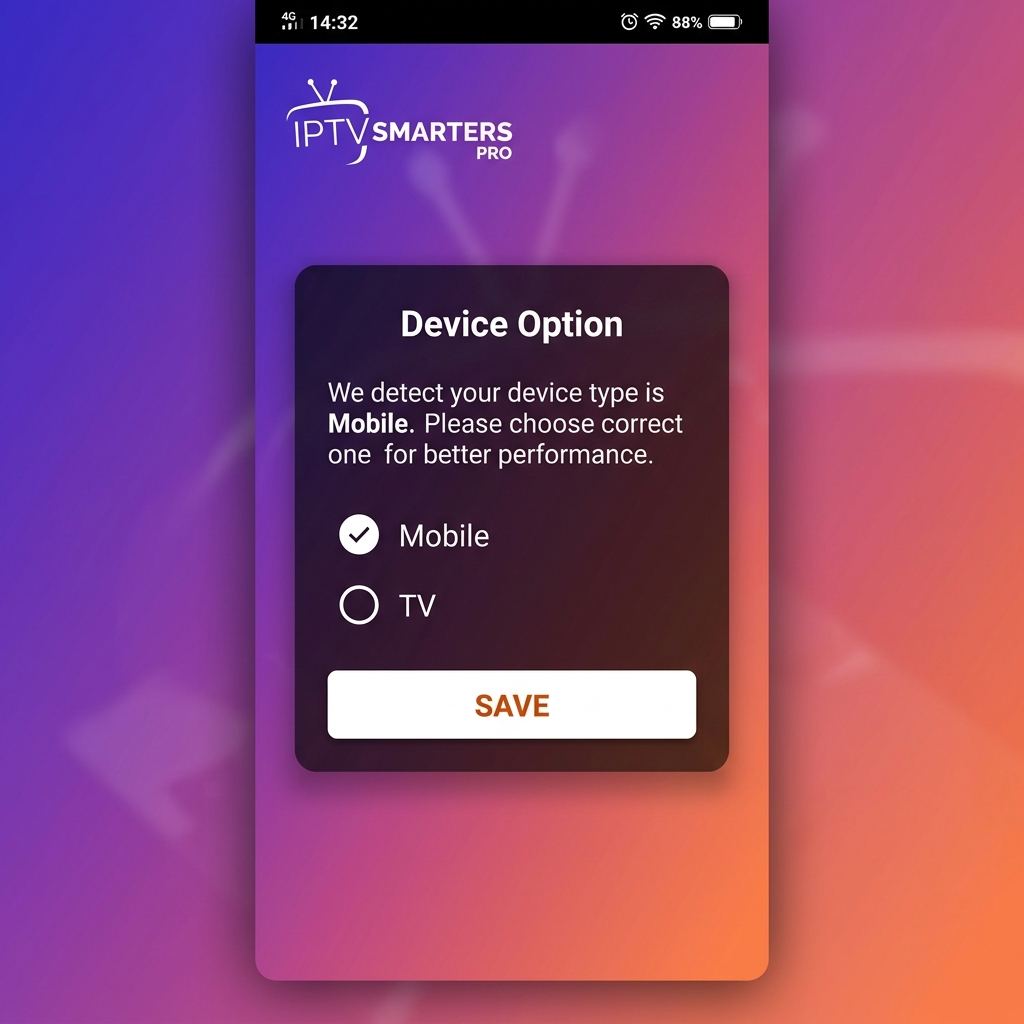
Select Your Platform
When launching the application, choose MOBILE if you are on a smartphone/tablet, or TV if you are on a Smart TV. Click SAVE.
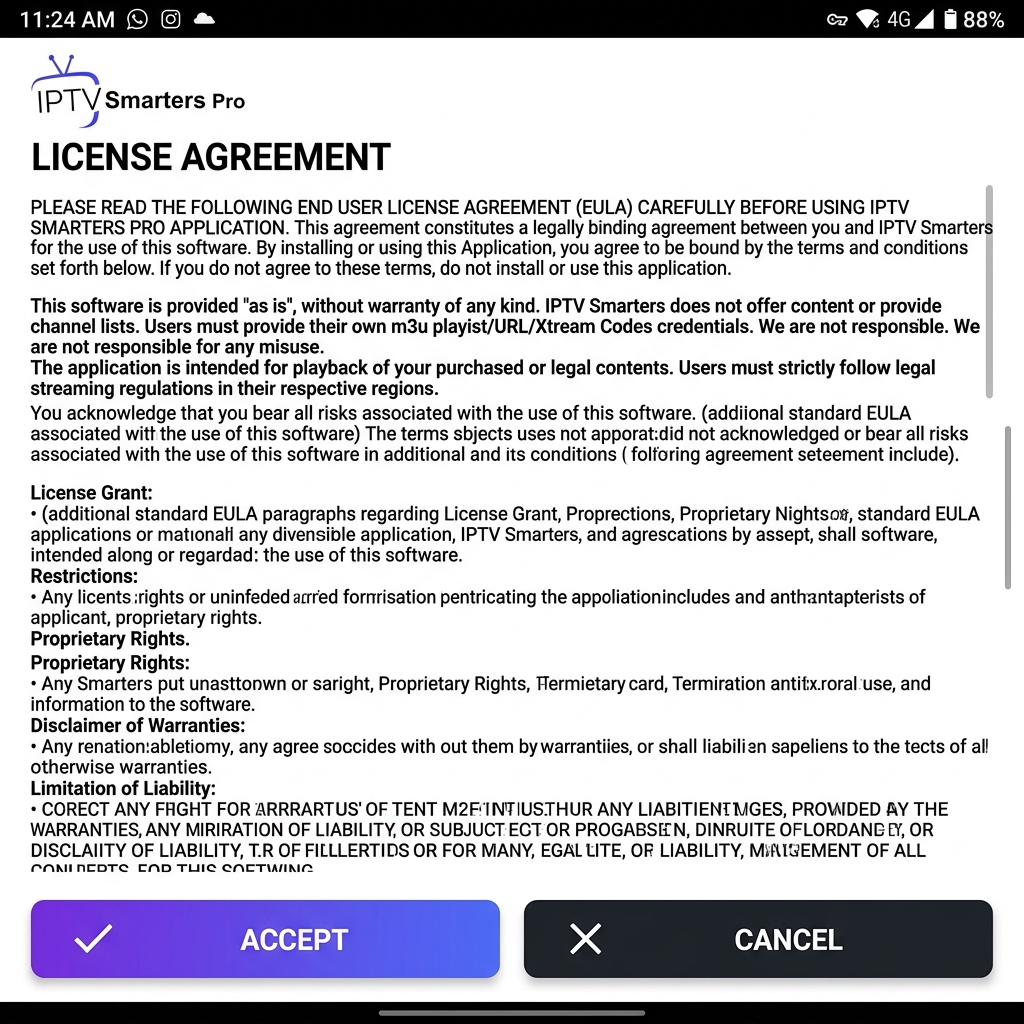
Accept the License Terms
The standard end-user license agreement will appear. Click the ACCEPT button to head to the profile login panel.
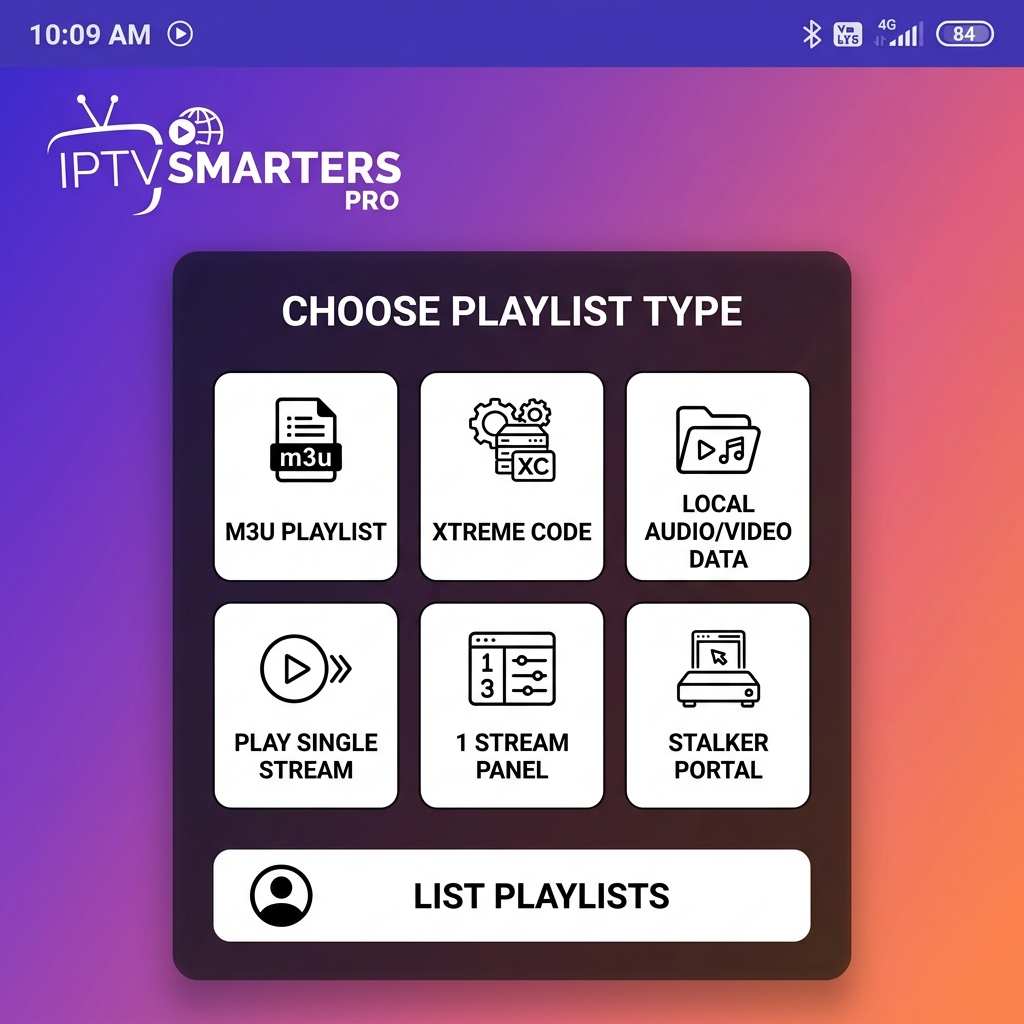
Select Login Protocol
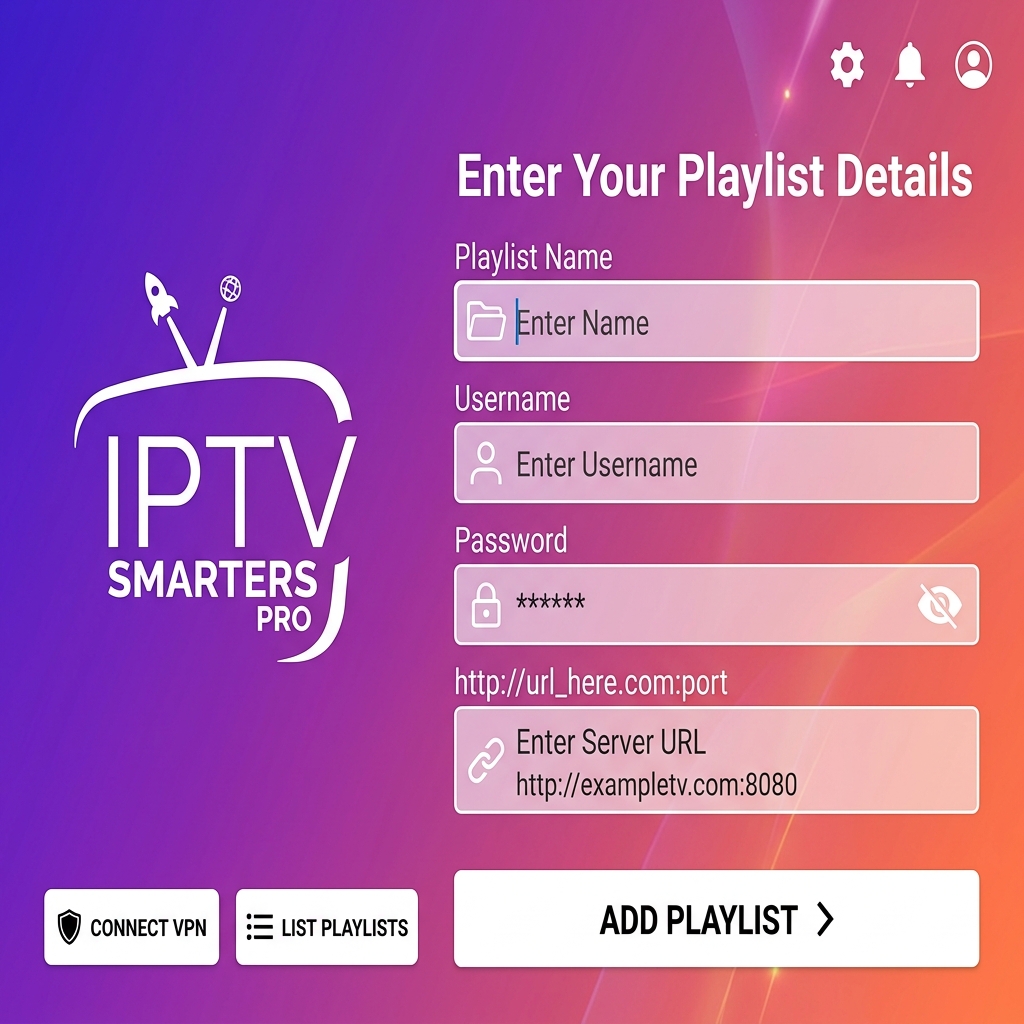
From the main menu page, click on ADD USER and choose LOGIN WITH XTREME CODES API (our recommended and most stable connection format).
Enter Subscription Credentials
Input the custom login credentials provided in your
receipt:
• Any Name: StreamHub
• Username: Your custom username
• Password: Your secure password
• URL: Official server host address
Then, click the ADD USER button.
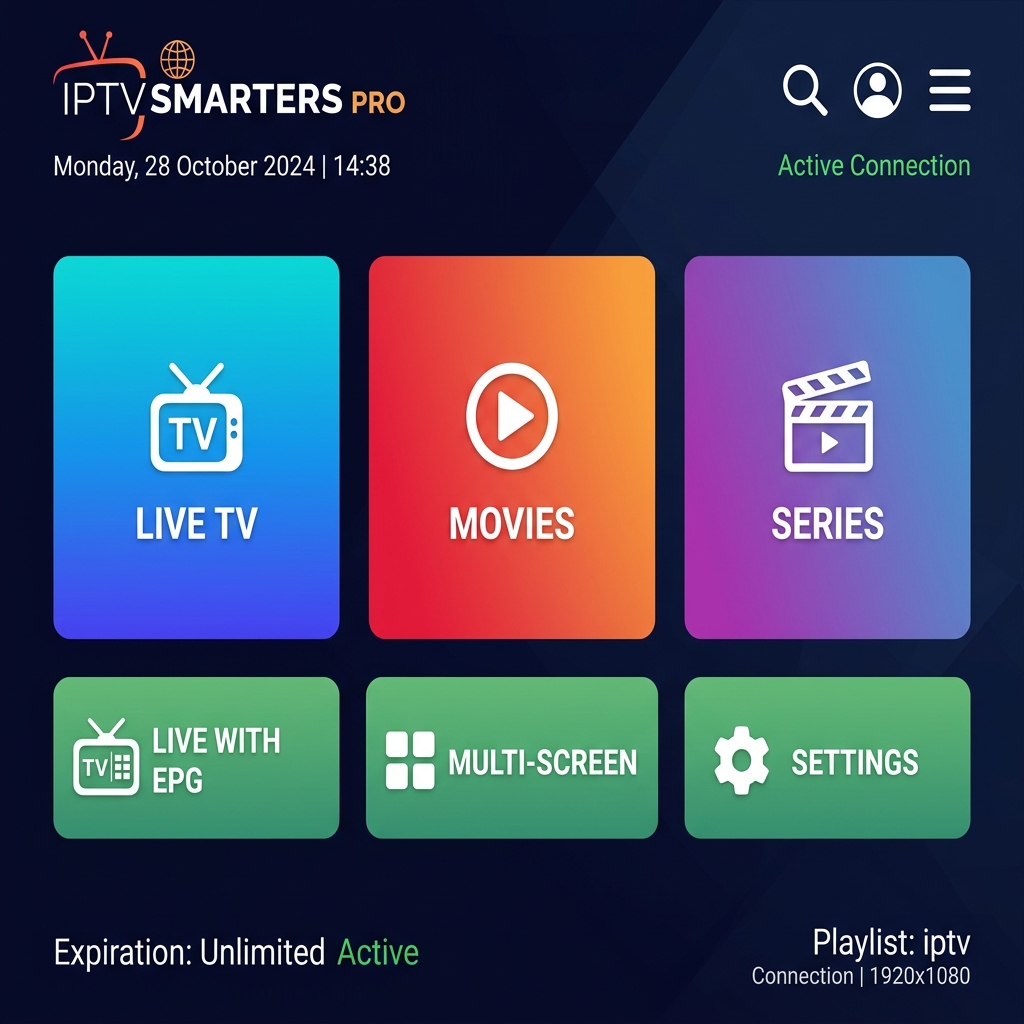
Begin Enjoying Content!
Your library is ready. You can now select LIVE TV for TV broadcasts, MOVIES for films, or SERIES for tv shows. Have fun!
History & Evolution of IPTV: From Humble Beginnings to the 4K Era
IPTV technology didn't start yesterday; its roots trace back to
the mid-1990s. At that time, dial-up internet speeds couldn't
support stable image transmission, but engineers envisioned a
future free from satellite dish limitations.
With advanced compression codecs and fiber optics, a giant leap
occurred. Today, with StreamHub Pro, we leverage
ultra-high-speed CDN architectures to deliver live sports events
with extremely low latency.
Family Safety: Parental Controls Configuration Guide
We fully appreciate the critical importance of keeping young
audiences safe from mature content. That is why all our compatible
platforms support state-of-the-art parental control options. You
can easily lock sensitive folders (such as adult sections) with a
custom password.
Within the IPTV Smarters Pro settings panel, simply navigate to
the "Parental Control" tab, configure a secure PIN, and ensure
peace of mind.
How to Record Live Broadcasts (PVR & Recording)
Afraid of missing the big game? No worries! With built-in PVR
recording features in our premium programs, you can capture live
feeds straight to internal or external storage.
All you need is sufficient storage room on your Android box or
computer. Simply hold-click a channel name, click "Start
Recording," or schedule automated timers easily.
Home Network Optimization Guide for Seamless Playback
4K streaming relies heavily on steady data throughput. Follow
these actionable network tips:
1. Swap to 5GHz WiFi: Use 5GHz wireless bands
instead of standard 2.4GHz to bypass local signal congestion.
2. Configure Rapid DNS: Update your hardware
settings to use Google DNS (8.8.8.8) or Cloudflare DNS (1.1.1.1)
for better latency.
3. Pause Auto-Downloads: Prevent other household
electronics from downloading large files during vital football
games.
App Battle: IPTV Smarters vs TiviMate
Picking the perfect application depends on your core requirements.
If you prize **ease-of-use and flexibility**, **IPTV Smarters
Pro** is the undisputed king—running seamlessly on all platforms
(iOS, Android, PC, macOS, Smart TVs).
However, if you want a ** premium cable box interface** for an
Android TV device, **TiviMate** offers superior aesthetics with
advanced multi-screen playback support.
MAG Boxes & KODI Setup: Advanced Solutions
Dedicated **MAG** physical receivers are extremely reliable
hardware platforms. To activate our subscription, simply send us
your MAC address so we can register it, and enter our Portal URL
link in your device configurations.
For **KODI** users, the official "PVR IPTV Simple Client" add-on
integrates your active subscription directly inside your home
theater software ecosystem.
Security & Reliability: Guaranteeing Uninterrupted Service
With digital broadcast services, encryption is your shield. At StreamHub Pro, we protect customer data with high-grade security and cycle servers periodically to prevent blocking. We strongly recommend keeping your credentials strictly private.
Android TV & Amazon Firestick Complete Setup
Android Smart Boxes and Amazon Firesticks represent the absolute best physical environments to run our service. Equipped with hardware decoders, they yield a fast, zero-lag premium TV interface.
Firestick Installation Steps:
- Head to System Settings, and select My Fire TV.
- Click Developer Options and toggled Allow Installation of Unknown Apps to ON.
- Launch the Downloader application, and enter quick-download code: 9935263 or the URL link aftv.news/9935263 .
- Download and open the setup program, and input your custom client details.
Smart TV Guides (Samsung & LG Smart TV Platforms)
Samsung Smart TVs
IPTV Smarters is a gorgeous media player custom-coded for users who wish to stream live television, on-demand movies, and complete series straight to their smart display.
Installation Steps:
- Step 1: Press the Source button on your official Samsung remote controller.
- Step 2: Navigate to the Search icon, type in IPTV Smarters Pro and download it.
- Step 3: Load the application program, and log in with your custom Xtream Codes credentials.
LG Smart TVs
IPTV Smarters provides a reliable, fast-loading playback interface for LG Smart TV webOS platforms, balancing UI elegance and operational stability.
Installation Steps:
- Step 1: Click the Home key on your LG Magic Remote to launch the app shelf.
- Step 2: Open the official LG Content Store program.
- Step 3: Head to search bar, input IPTV Smarters Pro, and install it.
- Step 4: Launch the program and enter your StreamHub Pro account info.
Apple Devices (iPhone, iPad, Apple TV setups)
Apple users command speed, minimalism, and stability, and our
server caters exactly to those standards. The premier App Store
applications fully compatible with StreamHub are:
1. Smarters Player Lite: The official, updated
free software, famous for its light size and fast response times
on iOS.
2. Snappy IPTV: A highly modern alternative
boasting beautiful user layouts and seamless group switching.
Desktop Computer & Laptop Solutions (Windows & macOS)
For streaming on large high-resolution monitor screens, we support
dedicated client packages:
• IPTV Smarters Desktop: Tailored specifically
for Windows and macOS (v1.1.2) for immersive cinematic viewing.
• Web Player Client: Quick access directly
through any web browser without downloading software.
• VLC Media Player: The universal open-source
program that plays M3U files reliably.
• SFVIP Player: The absolute fastest and lightest
PC application for opening 4K raw channels instantly.
The Technology Behind Stable Feeds: Codecs & Speed Requirements
| Resolution | Minimum Speed | Video Codec | Stability Rating |
|---|---|---|---|
| SD (480p) | 4 Mbps | H.264 | Extremely High |
| HD (720p) | 8 Mbps | H.264 / HEVC | High |
| FHD (1080p) | 15 Mbps | HEVC (H.265) | Requires Stable Line |
| 4K Ultra HD | 40+ Mbps | AV1 / H.265 | Ethernet Recommended |
We leverage state-of-the-art H.265 (HEVC) video compression schemas. This encodes data 50% more efficiently than legacy H.264 profiles, ensuring a highly cinematic, lag-free picture even on standard speed connections.
01. What is IPTV Smarters Pro? (A Detailed Deep Dive)
The IPTV Smarters Pro software is a highly advanced multimedia player engineered for internet protocol stream rendering. It organizes and displays complex TV playlists within an incredibly responsive, premium interface that matches commercial OTT apps.
Primary Features of the Application (Key Features):
02. Does the Application Contain Pre-loaded Channels?
Crucial Answer: No, IPTV Smarters Pro does not host or distribute any media content. It is strictly a software engine (Player) enabling clients to view their own legal playlists. It renders added M3U playlists, web addresses, or local media files.
License Agreement & Legal Disclaimer
LICENSE AGREEMENT
YOU HEREBY AGREE TO TERMS HERE OTHERWISE DO NOT USE THE APP.IPTV Smarters Pro is an advanced player that uses M3U and JSON user-added playlists. We do not provide any actual playlists or contents.
This application is designed to use with the user’s own or added playlist with legal contents.
You are responsible to check your added playlists/contents are legal and you have full rights to use and/or RECORD contents.
We are not responsible for misuse of copyright or third party contents using our software.
By using our application means you accept the above terms and conditions.
DISCLAIMER
• IPTV Smarters Pro does not provide or solicit any audiovisual content to the users.• IPTV Smarters Pro has no affiliation with any third-party provider whatsoever.
• Users must provide their own contents.
• We strictly do not endorse the streaming of copyright-protected material without permission of the copyright holder.
Privacy & Safety: Do You Actually Need a VPN?
In today's digital climate, web privacy is paramount. A VPN is not
just for bypassing geographical filters; it acts as a firewall
preventing your Internet Service Provider (ISP) from throttling
bandwidth when detecting high-volume continuous video streams.
We suggest utilizing premium services like
NordVPN or ExpressVPN to secure
strong end-to-end data encryption, guaranteeing an incredibly
stable StreamHub connection.
Pro IPTV Glossary & Terminology
Resolving Common Activation Issues
Ultimate FAQ (Frequently Asked Questions)
Ready to launch the ultimate streaming experience? Get activated now!
Need Assistance? Chat on WhatsApp